How to track magic items: attunement, charges and recharge
The short answerOn the Inventory tab, press an empty attunement slot and pick the item, or press Attune in the item's details: its benefits count while it is equipped and attuned. Charges show on the item's row on the Actions tab, and a rest rolls each item's recharge for you, such as 1d6+1 at dawn.
- For players
- 6 short steps
- Updated 7 November 2026, for Archivist 1.4.0
The example is Ser Aldric Vane, attuned to a Cloak of Protection.
Attune an item
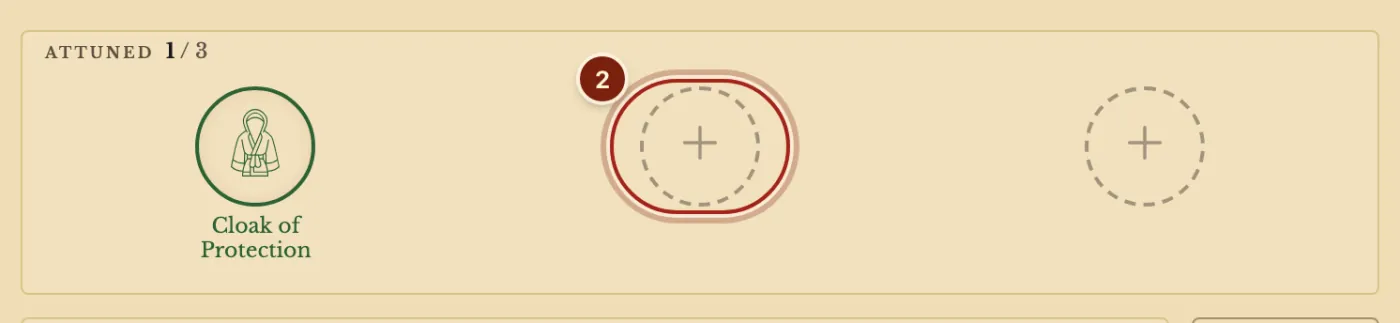
- Open the Inventory tab. The band at the top shows Attuned and your slots, such as 1 / 3.
- Press an empty slot, then Pick beside the item. Or open the item's details and press Attune.
- Equip the item too, with Equip in its details. Its bonuses count while it is equipped, and attuned when it needs it.
To end attunement, press the item's slot and choose Unattune. If all three slots are full, Archivist asks which one to replace.
Spend charges and recharge
- On the Actions tab, find the item's row and tick a box for each charge you spend. More than eight charges show as a counter.
- Take a Long Rest, or a Short Rest for items that recharge on one. The rest window rolls each item's recharge, such as regains 4 (1d6+1).
- Press the number to type your own roll, or untick the line, then press Confirm.
The inventory row shows charges as, for example, 3/7 ch. To change an item's charges or how it recharges, open its details and press Customize.
Where each part shows
One item, several places on the sheet.
| You want | Where it is |
|---|---|
| Your attunement slots | The band at the top of the Inventory tab. |
| Only your attuned items | The Attuned filter on the Inventory tab. |
| To spend a charge | The item's row on the Actions tab, or the Resources tab. |
| To see what an item gives | Hover a number such as Armor Class: the item is named in what adds up to it. |
| To change charges or recharge | The item's details, Customize, then Charges and Recovers. |
Questions
Does attuning equip the item?
No. Attuning and equipping are separate, as in the rules. Unequipping an attuned item asks first, because it also ends attunement.
Can I have more than three attunement slots?
Yes, when a feature gives more. The band shows your number of slots.
Can I make my own magic item with charges?
Yes. See Make a homebrew magic item.
Keep going
- Track inventory, bags and attunementAdd items, drag them into a bag, attune, and the sheet follows.
- Make a homebrew magic itemDescribe it to the Archivist Inquiry Assistant, or copy an item and change it by hand.
- Short rest, long rest and Hit DiceThe campfire and moon buttons list what comes back; spend Hit Dice in the Short Rest window.