How to take a short rest, a long rest and spend Hit Dice
The short answerPress the campfire at the top of your sheet for a Short Rest: pick how many Hit Dice to spend and press Roll & Apply to heal. Press the moon for a Long Rest. Both windows list what comes back, such as spell slots, Hit Dice and feature uses, and you press Confirm.
- For players
- 8 short steps
- Updated 7 November 2026, for Archivist 1.4.0
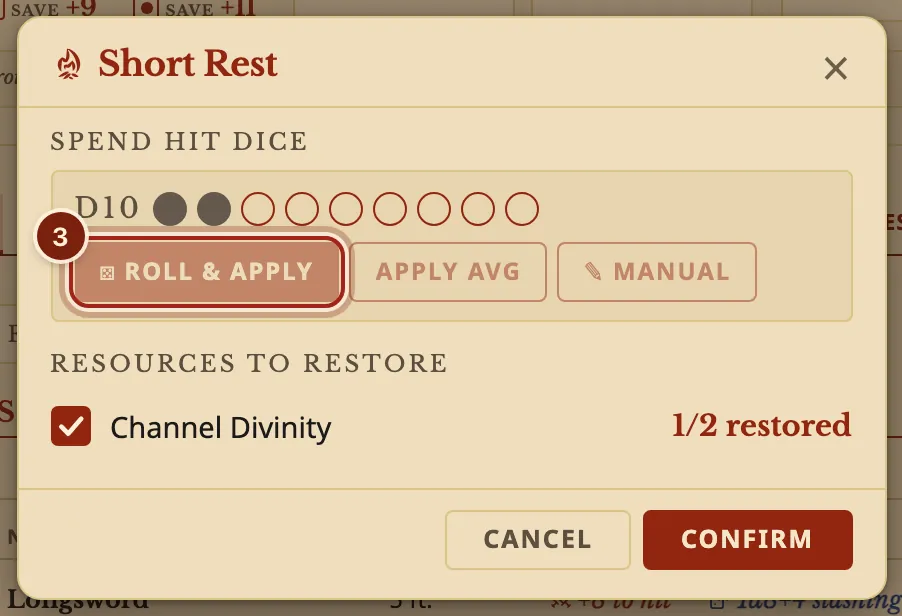
The example is Ser Aldric Vane, a Paladin 9 with two Hit Dice spent.
Take a Short Rest
- Press the campfire button at the top right of your sheet.
- Under Spend Hit Dice, press a circle to pick that many dice.
- Press Roll & Apply to roll them, or Apply Avg to take the average. Each die adds your Constitution modifier.
- Under Resources to restore, untick anything that should not come back.
- Press Confirm.
Rolled your own dice at the table? Press Manual and type the total.
Take a Long Rest
- Press the moon button beside the campfire.
- Read the list: hit points, spell slots, Hit Dice, Exhaustion and feature uses, each with what changes.
- Untick anything your DM says does not come back, then press Confirm.
A Long Rest also offers to end anything still running, such as a spell or Wild Shape, and lists the spells you may change.
What comes back on each rest
Each window lists these with a tick box, so nothing changes until you press Confirm.
| Short Rest | Long Rest | |
|---|---|---|
| Hit points | What your Hit Dice heal | All of them |
| Hit Dice | Spent to heal | Some come back, as the window shows |
| Spell slots | Warlock Pact Magic | All of them |
| Feature uses | Those that come back on a Short Rest | Every use that comes back on a rest |
| Item charges | Items that recharge on a Short Rest | Items that recharge at dawn or on a rest, with the roll shown |
| Temporary hit points | Kept | They end |
Questions
Where do I see my Hit Dice?
On the strip at the top of the sheet, as Hit Dice with the die beside it, and on the Resources tab. Press − or + to change them by hand.
Can I undo a Short Rest?
The healing from Hit Dice applies as soon as you roll. Everything under Resources to restore waits for Confirm, so Cancel keeps those as they were.
Does it work for a multiclass character?
Yes. Each die size has its own row, such as d10 and d6.
Keep going
- Track Rage, Channel Divinity, Bardic Inspiration and Focus PointsEvery use is a tick box or a counter, and rests fill them back.
- Magic items: attunement, charges and rechargeAttune in the Inventory tab; charges come back on the right rest.
- Track spell slots and prepare spellsCAST spends the slot; Manage spells prepares, swaps and learns.