How to connect ChatGPT to Archivist
The short answerIn the ChatGPT desktop app, open Codex, then Settings and MCP servers, and press Add server. Pick Streamable HTTP, paste https://api.archivist.gg/mcp, save, restart the app and press Authenticate: your browser opens Archivist, where you press Allow. Then ask about one of your characters.
- For players and DMs
- 12 short steps
- Updated 19 November 2026, for Archivist 1.7.0
Steps from ChatGPT's and Codex's own help pages, read 19 November 2026. Codex in the desktop app works with ChatGPT Plus, Pro, Business, Enterprise and Edu, and with Free and Go as it reaches them.
In the ChatGPT desktop app
- Open the ChatGPT desktop app, sign in, and open Codex.
- Open Settings, then MCP servers, and press Add server.
The form to add a server opens.
- Pick Streamable HTTP, name it Archivist, paste the address and press Save:MCP address
https://api.archivist.gg/mcp - Restart the app, then press Authenticate beside Archivist. Your browser opens Archivist.
Allow it in Archivist
- Your browser opens Archivist. Sign in if it asks.
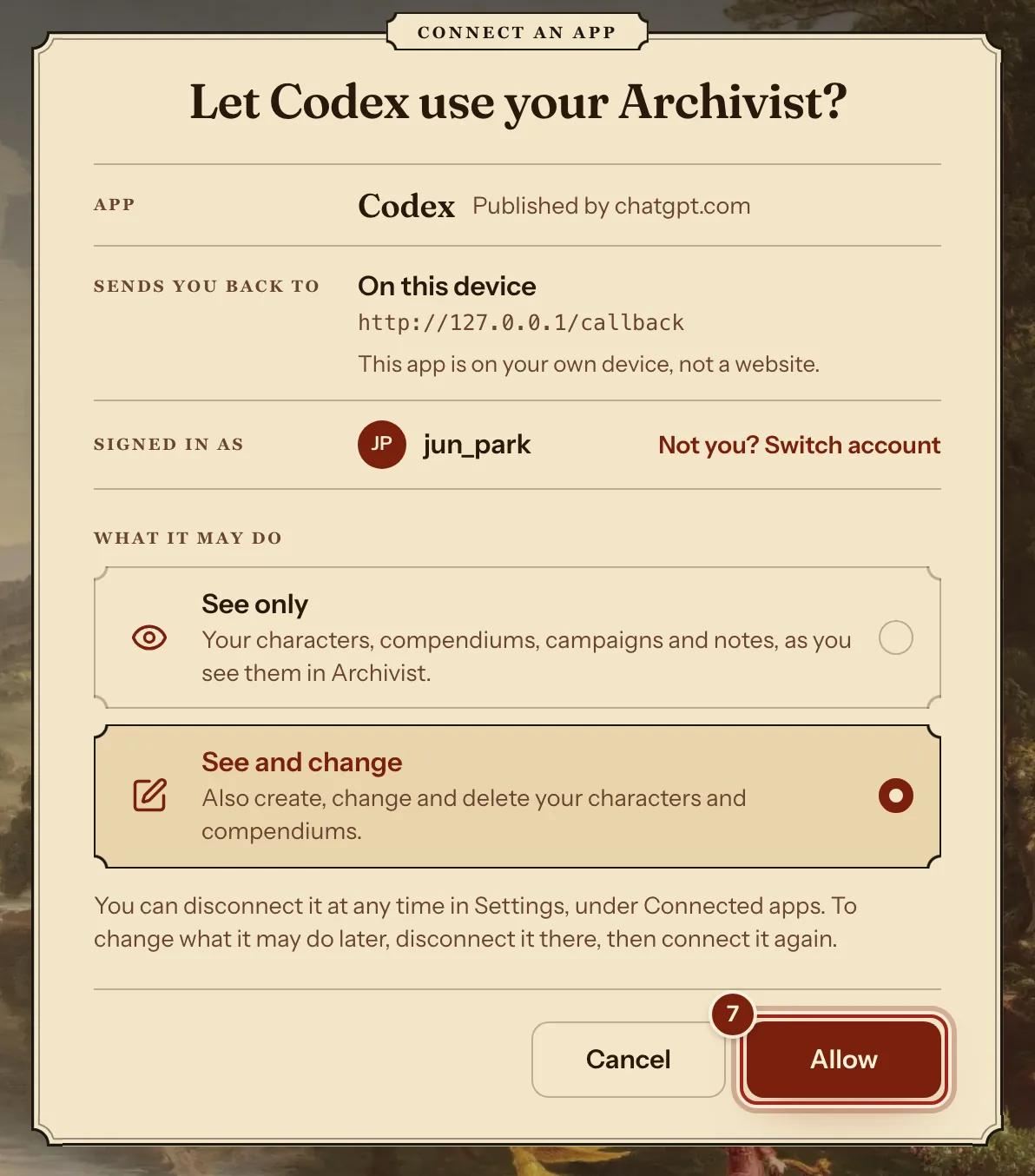
- Check the app: Codex, with Published by chatgpt.com next to its name, and Sends you back to: On this device, then an address on your own computer starting with http://localhost or http://127.0.0.1.
- Under What it may do, keep See and change to let it bring things in, or pick See only. Press Allow.
The page says the app is connected and takes you back to it. If you waited too long, it offers Start again. You can disconnect the app at any time in Settings, under Connected apps.
Ask it about your character
- In Codex, paste this first prompt:Prompt
Use Archivist. Tell me which account you are signed in to and whether you can change things or only see them, then list my characters and my compendiums. - When it asks before it uses an Archivist tool, allow it.
It answers with your account's name, what it may do, and your characters and compendiums.
- Ask about one of your characters, such as:Prompt
In Archivist, what is Grendal the Wary's Armor Class, and what gives him that number?
It answers with the number and what gives it, read from Archivist.
In ChatGPT's chat on the web
- On chatgpt.com, an admin or owner of a Business, Enterprise or Edu workspace adds Archivist as a custom MCP server, with the address and OAuth as its sign-in.
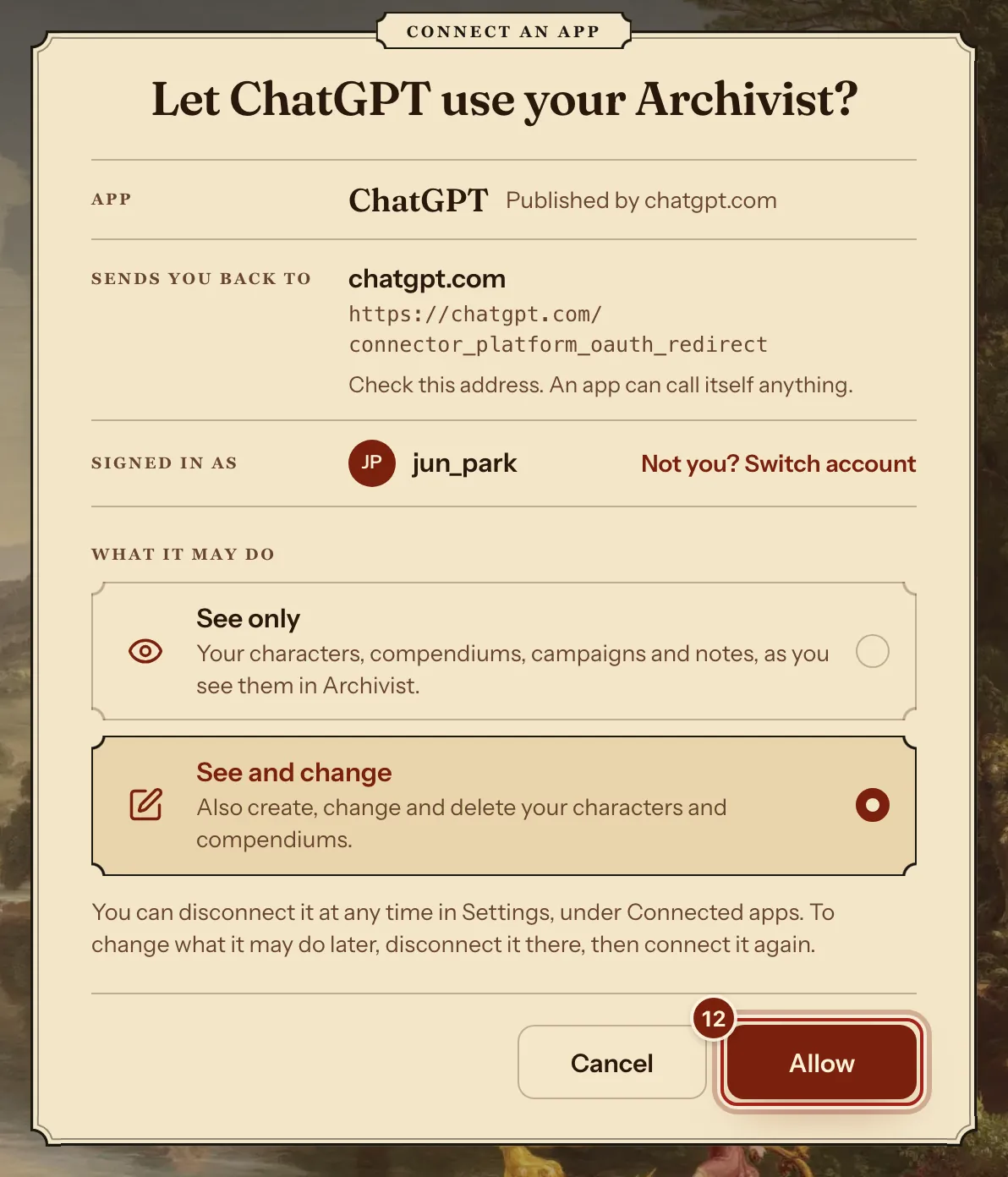
- In a chat, type @ and pick Archivist, then sign in to Archivist. The allow page names ChatGPT, Published by chatgpt.com, and sends you back to chatgpt.com. Press Allow.
In ChatGPT's chat on the web, a custom server that can change things is for Business, Enterprise and Edu workspaces; on Pro it can only read (ChatGPT's help pages, 19 November 2026). To bring things in, use Codex in the desktop app, above.
Questions
Can it read a photo of my sheet?
Yes. Paste it or drag it into Codex. See Bring in a character or homebrew with the ChatGPT desktop app.
Does it work in ChatGPT's phone app?
ChatGPT adds custom servers on the web only (ChatGPT's help pages, 19 November 2026). Use Codex in the desktop app.
How do I stop it?
In Archivist, open Settings and press Disconnect on its row under Connected apps.
Keep going
- Connect your own chat app to ArchivistAdd one address in your chat app, sign in, and it can read and change your characters.
- Bring in a character or homebrew with the ChatGPT desktop appIn the desktop app's Codex: a sheet, or homebrew from a PDF or pasted text.
- Prompts to copy for your chat appCheck the connection, bring in a sheet, a book or homebrew, and fix notes.
- Connect Codex to ArchivistTwo commands in a terminal, or the IDE extension's MCP servers.