Prompts to copy for your chat app and Archivist
The short answerBy hand, Archivist's Builder and homebrew editor do these jobs too: press New character or New homebrew…. With your chat app, connect it first, then paste one prompt per job. Archivist tells your chat app how to do each job, so a prompt only says what you want and which file: the first one checks the connection, and the others bring in a character sheet, monsters and spells from a text, a whole book or a homebrew item, change one character, or fix notes.
- For players and DMs
- 13 short steps
- Updated 19 November 2026, for Archivist 1.7.0
The examples use Grendal the Wary and the Drowned Coast, Archivist's own sample homebrew. Change the names and the files to yours. Bring in only what you own or have the right to use.
By hand, in Archivist
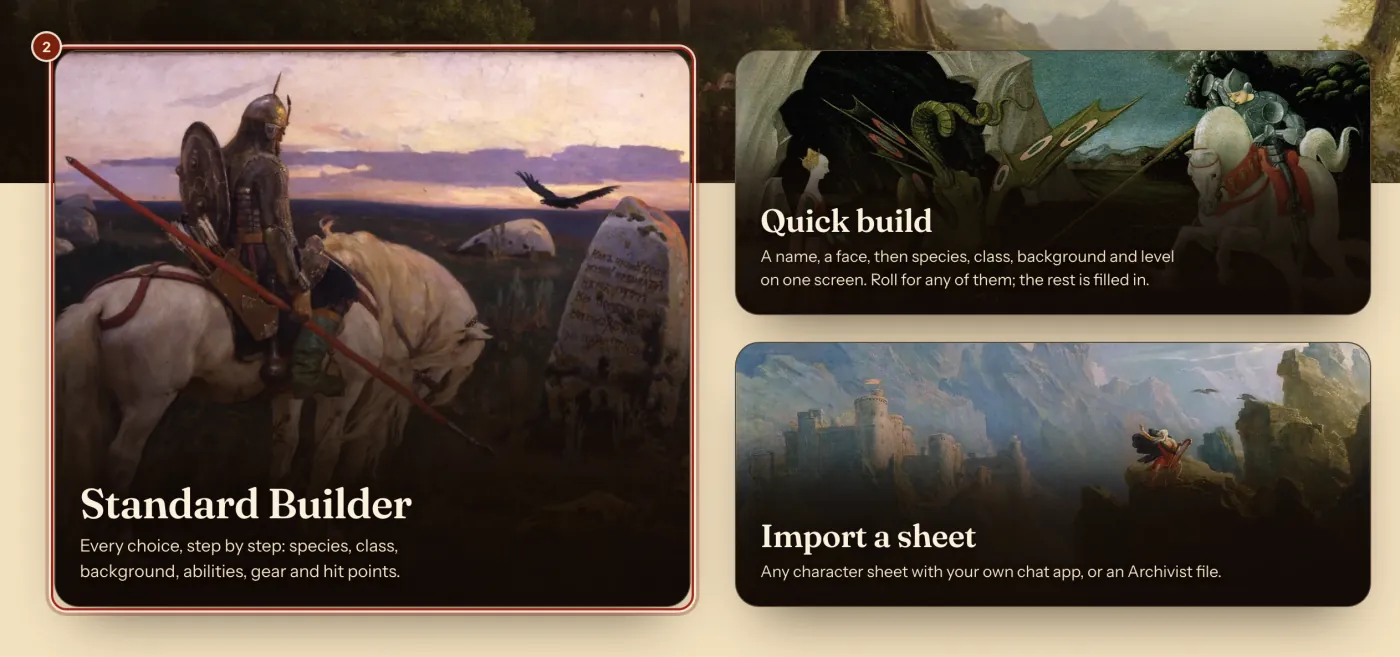
- On the Characters page, press New character.
- Press Standard Builder and copy your sheet in step by step: species, class and levels, background, abilities, equipment and hit points. Or press Quick build for a ready character to change as you like.
For homebrew, the homebrew editor does the same by hand: press Compendium, then the ⋯ beside Homebrew and New homebrew…. Make a character, Quick build and Make homebrew from scratch walk each one.
Set it up
- In Claude Code, paste this to add Archivist for every folder, then sign in with
/mcp:PromptAdd Archivist to Claude Code for every folder: run claude mcp add --transport http -s user archivist https://api.archivist.gg/mcp, then tell me how to sign in.
- In Codex, paste this to add Archivist, then sign in with
codex mcp login archivist:PromptAdd Archivist to Codex: run codex mcp add archivist --url https://api.archivist.gg/mcp, then tell me how to sign in.
Claude on the website and the ChatGPT desktop app add Archivist in their own settings: see Connect your own chat app.
Check the connection
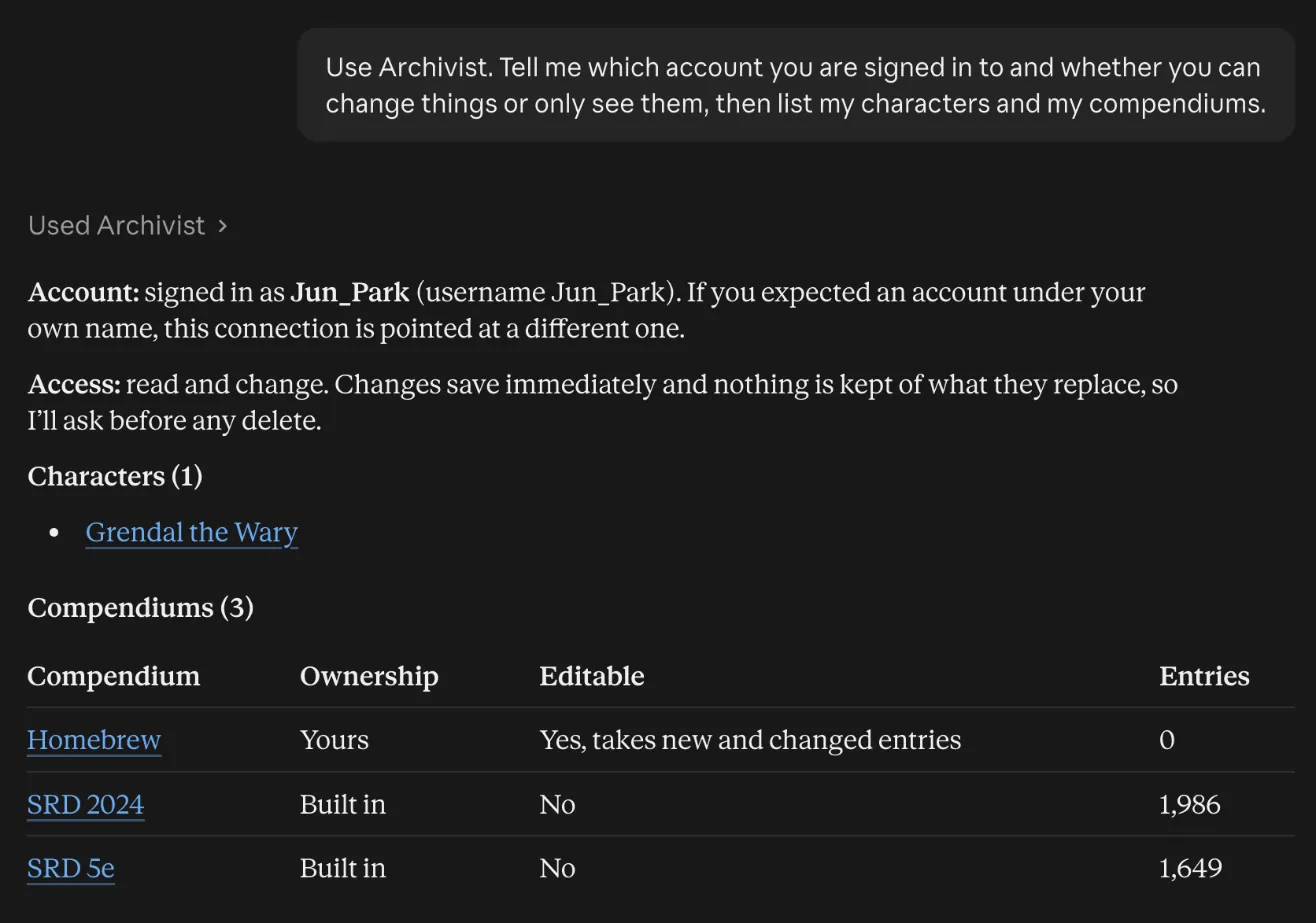
- Paste this first. It answers with your account's name, what it may do, and your characters and compendiums:Prompt
Use Archivist. Tell me which account you are signed in to and whether you can change things or only see them, then list my characters and my compendiums.
Bring things in
- A character sheet: give your chat app the PDF, a photo of each page, or the sheet's text, and paste:Prompt
Make this character in Archivist from the sheet I gave you.
In Claude Code or Codex, put the file in the folder and name it: Make this character in Archivist from the sheet grendal-the-wary.pdf in this folder. It reads the whole sheet first. With a sheet that settles everything, such as the sample sheet, it can save the character without a question. When the sheet leaves something open that it cannot work out, such as the armor behind a printed Armor Class or where an Expertise comes from, it asks first and saves nothing until you have answered. For something on the sheet that none of your compendiums has, it asks you for its text, to make it as your own homebrew, or whether to leave it out for now: Archivist tells it never to write rules from memory.
- Monsters, spells and items from a PDF, a web page's text or your own notes: paste this with the text, or name the file:Prompt
Add the monsters, spells and items in this text to a compendium in Archivist:

(paste the text here)
When you have more than one compendium of your own, it asks which one the entries go in, or offers to make one; with one, it uses it and tells you so. It asks about any number the text leaves open, such as a recharge or a damage die. What the SRD or your compendiums already have is linked, not written again.
- Monsters, spells and items on a web page, from its address, such as the sample page's:Prompt
Add the monsters, spells and items on this page to a compendium in Archivist: https://archivist.gg/sample-homebrew/
If your chat app cannot open the page, paste its text with the prompt above.
- A whole book: name the file, and it lists what the book holds and agrees with you what to bring in first:Prompt
Bring the whole book my-homebrew-book.pdf into Archivist, in a compendium of its own.
- Picking up a book after a break, in a new chat:Prompt
Carry on bringing my-homebrew-book.pdf into Archivist. Look at what its compendium holds already, then do the next part.
The book's compendium in Archivist is the record of what is done, so a new chat carries on where the last one stopped.
Make, change and fix
- A homebrew item from your own description:Prompt
Make a homebrew magic item in Archivist: the Saltglass Charm, an uncommon sea-glass necklace that needs attunement. While you wear it you have a Swim Speed of 30 feet. It has 3 charges, and 1d3 come back at dawn: spend 1 as a Magic action to cast Water Breathing.
It asks about every number you left open, compares it with two or three SRD items, and asks which compendium it goes in when you have more than one.
- One change to one character:Prompt
Add a Bag of Holding to Grendal the Wary's inventory in Archivist.
- Notes that do not open, or use old lines:Prompt
Look through my characters and compendiums in Archivist for notes that do not read or that use old lines. Tell me what you find before you change anything.
It reports what it found first, and fixes only what you agree to.
What your chat app asks you
Archivist tells your chat app to ask instead of guessing, and to gather its questions together.
| When | It asks you |
|---|---|
| The sheet or the text names something none of your compendiums has | For its text, to make it as your own homebrew, or whether to leave it out for now. |
| The source leaves a number, a recharge, a target or a choice open | Which one, with the options it sees. |
| A character's scores fit no way of starting the Builder knows | To confirm the base scores it worked out. |
| It brings in monsters, spells or a book | Which compendium they go in, or whether to make one, when you have more than one of your own; with one, it uses it and says so. |
| Something would be deleted | For a yes first, saying what goes. |
Questions
Do I need to explain how Archivist works to my chat app?
No. Archivist tells it how to do each job, what to check and when to ask you.
Why does it ask me about a feat or an item?
Because it is on your sheet and in none of your compendiums. Give it the text to make it as your own homebrew, or leave it out for now.
Does it fill in every pick?
It fills every pick your sheet settles. The ones your sheet leaves open, such as weapon masteries or a tool, wait for you in the Builder.
Keep going
- Connect your own chat app to ArchivistAdd one address in your chat app, sign in, and it can read and change your characters.
- Import a character from a PDF or a photo of your sheetGive your chat app a PDF, photos or the text of any sheet, and it makes the character.
- Bring in homebrew from a PDF, a web page or pasted textGive your chat app the PDF, the page or the text, and it makes the entries.
- Bring a whole homebrew book or supplement into ArchivistGive your chat app the book, and it brings it in batch by batch.