How to track Rage, Channel Divinity, Bardic Inspiration and Focus Points
The short answerYour class's resources are already on your sheet: tick a box on the feature's row each time you use it, or press − on its counter. The Resources tab lists them all under Short Rest, Long Rest or Doesn't reset, and the rest buttons fill them back.
- For players
- 5 short steps
- Updated 7 November 2026, for Archivist 1.4.0
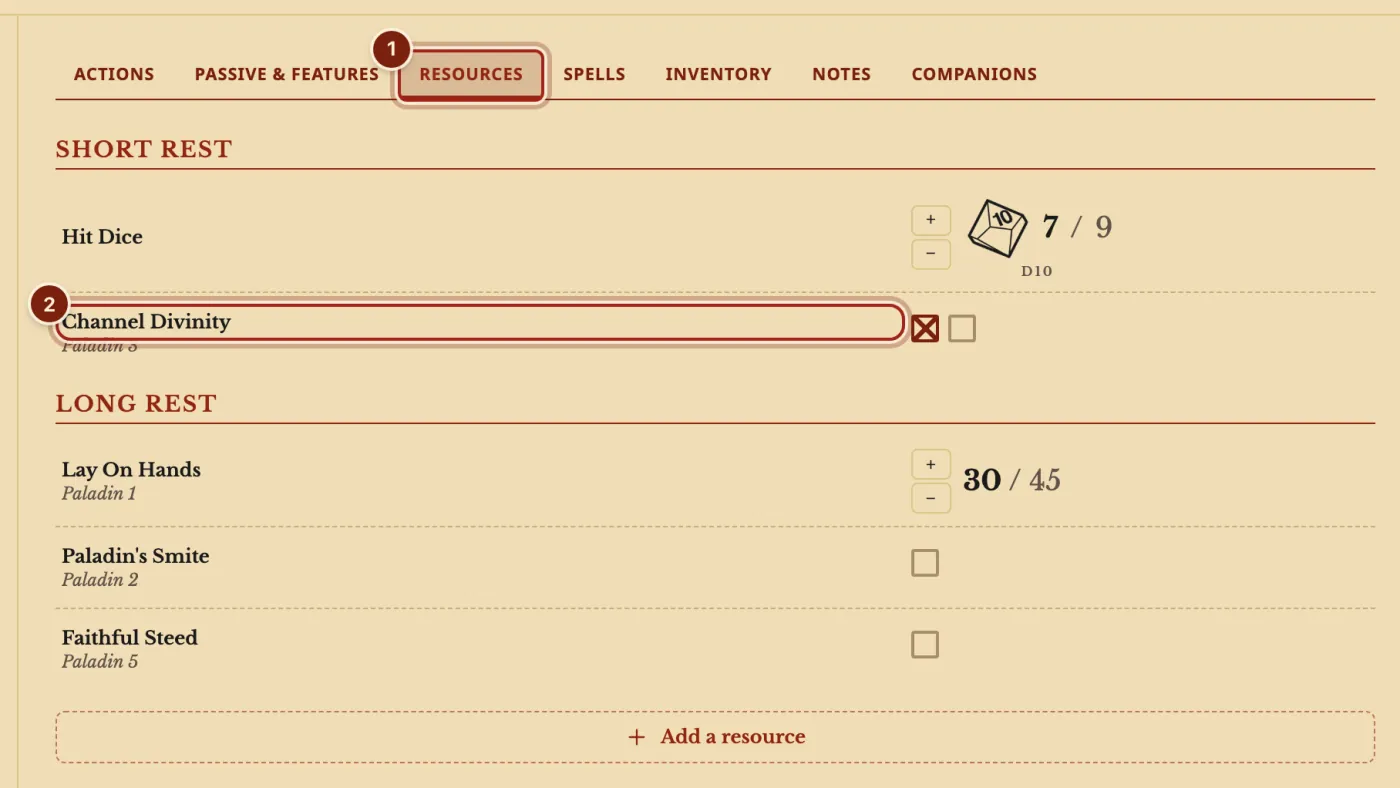
The example is Ser Aldric Vane, a Paladin 9, with Channel Divinity and Lay On Hands.
Use and refill a resource
- Open the Resources tab to see every resource in one list, grouped by the rest that fills it.
- Tick a box each time you use the feature. A resource with more than eight uses, such as Lay On Hands, is a counter: press −, or press the number and type.
- Take a Short Rest or a Long Rest. The rest window lists each resource that comes back.
The same boxes sit on the feature's row on the Actions tab, so you can use a feature and spend it in one place.
Hold another bard's Bardic Inspiration
- When a bard gives you Bardic Inspiration, press Add a resource at the bottom of the Resources tab, then Bardic Inspiration, and pick the die.
- A treble clef shows you have it. Your check, save and attack windows offer the die, and pressing the treble clef marks it used.
How each resource is counted
Uses come from your class's table and your scores, and follow your level.
| Resource | How many | Comes back |
|---|---|---|
| Rage | From the Barbarian table: 2 at level 1, up to 6 | Long Rest; the 2024 rules also give one back on a Short Rest |
| Bardic Inspiration (your own) | Your Charisma modifier, at least 1, with a die from d6 to d12 | Long Rest, and also a Short Rest from level 5 |
| Channel Divinity | From your class table | On a rest, as its heading on the Resources tab says |
| Focus Points (2024) or Ki (2014) | Your Monk level | Short Rest |
| Lay On Hands | Five times your Paladin level | Long Rest |
| Homebrew resources | Whatever the entry says | Whatever the entry says |
Questions
Does pressing Activate spend a use?
No. Activate switches a feature's benefits on and off, such as Rage. Tick a box for the use.
Can I put Rage next to my hit points?
Where is my wizard's spellbook?
Spells and spellbooks are on the Spells tab, in Manage spells. See Track a wizard's spellbook.
Where does my steed or familiar go?
On the Companions tab, with its own stat block to roll from. See Add a monster as a companion.
Can I add a resource of my own?
Yes, with a short homebrew entry. Add Sanity to a character sheet builds one step by step.
Keep going
- Choose the resources on top of your sheetAppearance, then Pinned: pick up to five and put them in order.
- Short rest, long rest and Hit DiceThe campfire and moon buttons list what comes back; spend Hit Dice in the Short Rest window.
- Track a wizard's spellbook, and a lost bookWrite and copy spells into your book, prepare from it, and mark it lost or found.