How to make your sheet yours: colors, paper and portrait looks
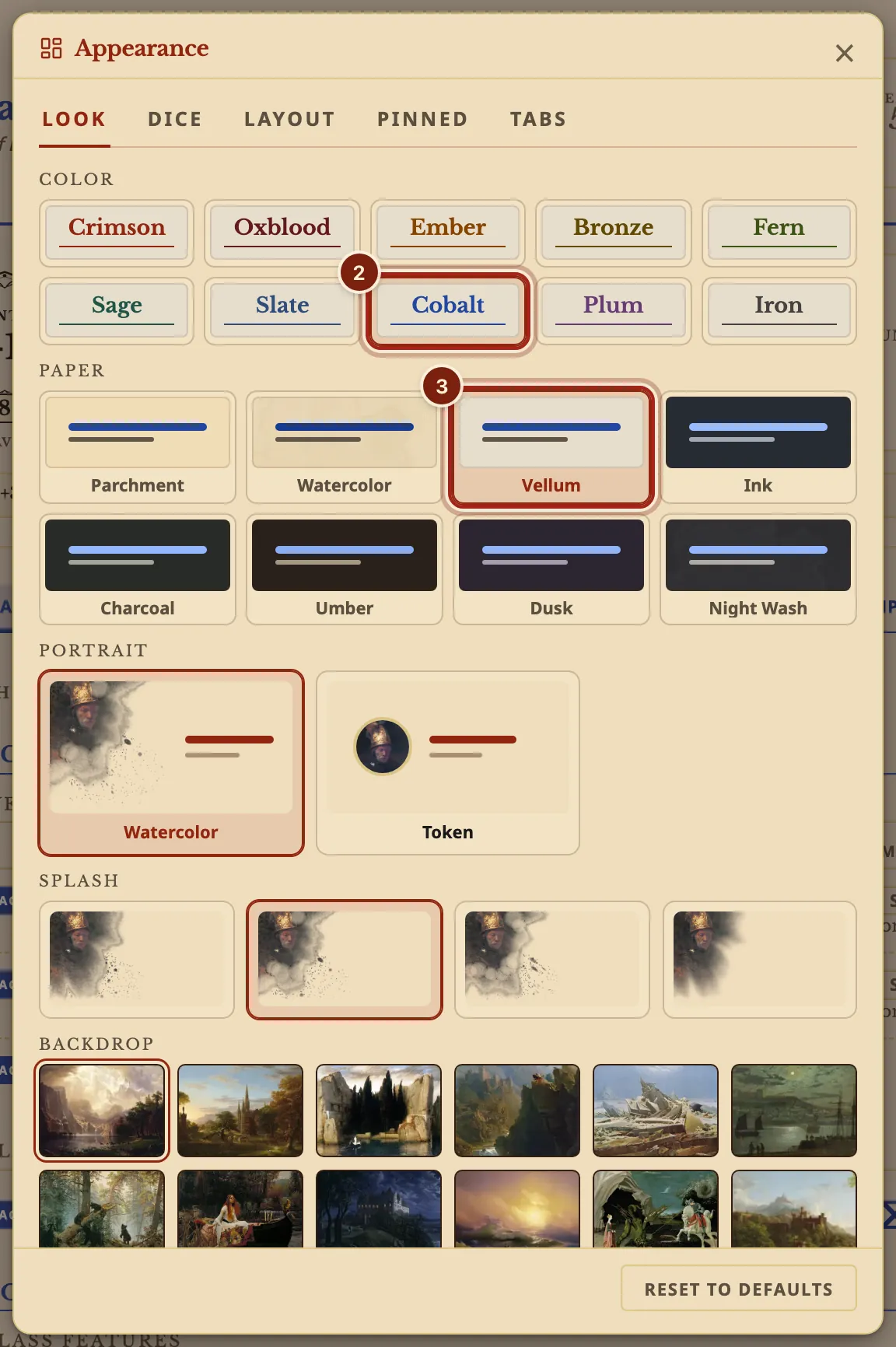
The short answerOn your sheet, press the button beside the gear to open Appearance. On its Look tab, pick a Color, a Paper, a Backdrop and the portrait's look: each change shows at once, and is saved with that character only.
- For players
- 7 short steps
- Updated 7 November 2026, for Archivist 1.4.0
The example is Ser Aldric Vane in Cobalt on Vellum.
Pick a Color and a Paper
- On your sheet, press the button beside the gear by your character's name. Appearance opens on its Look tab.
- Under Color, press one of ten: Crimson, Oxblood, Ember, Bronze, Fern, Sage, Slate, Cobalt, Plum or Iron.
- Under Paper, press one of eight. Parchment, Watercolor and Vellum are light; Ink, Charcoal, Umber, Dusk and Night Wash are dark.
- Under Portrait, pick Watercolor or Token, and under Splash, how the watercolor portrait fades into the page.
- Under Backdrop, pick the painting behind the sheet.
On a phone, press your portrait or name, then Appearance. Reset to defaults puts everything back.
Give each portrait look its own picture
- Press your character's portrait. The portrait window shows three looks: Watercolor for the sheet, Token for campaigns and rolls, and Card for the Characters page.
- Press Change picture for a look to give it its own picture, or Change shared picture for all three. Pick one from the Gallery or Upload your own, then press Done.
What each Appearance tab changes
Your choices are saved with this character, so each character can look different.
| Tab | What you pick |
|---|---|
| Look | Color, Paper, the portrait's look and splash, and the backdrop. |
| Dice | The dice set this character rolls, and how other players' and the DM's rolls show. |
| Layout | Two columns or three, and Heroic Inspiration as a counter, a tick box or a star. |
| Pinned | The resources on the strip at the top. See Choose the resources on top of your sheet. |
| Tabs | The order of the sheet's tabs, and which ones to hide. |
Questions
Does my share link use my look?
Yes. The share page and the share picture wear your character's Color and Paper.
Can each character look different?
Yes. The look is saved with each character, so a cleric can be on Vellum and a warlock on Night Wash.
Are the dice sets and themes free?
Yes. Dice sets, themes and the sheet's looks are all free.
Keep going
- Choose the resources on top of your sheetAppearance, then Pinned: pick up to five and put them in order.
- Share your character with a linkCharacter menu, Share character, then Copy link.
- Add Sanity to a character sheetAsk the Archivist Inquiry Assistant for Sanity and an ability that spends it, or build both by hand.