How to add Sanity to a 5e character sheet
The short answerDescribe Sanity and the ability that spends it to the Archivist Inquiry Assistant on your character's sheet, and approve what it suggests. Sanity then sits on the strip at the top of the sheet with + and −, and the ability waits on the Actions tab with Activate and a Spend control. You can also build both by hand with the lines below.
- For players and DMs
- 15 short steps
- Updated 7 November 2026, for Archivist 1.4.0
The example is Forbidden Insight: as a Bonus Action, roll 1d6 and spend that much Sanity, and for 1 minute your weapon hits deal an extra 1d6 Psychic damage and you have Advantage on Perception and Insight checks. Change any word or number to suit your table.
Make it with the Archivist Inquiry Assistant
- Open your character's sheet. Press the owl at the right edge of the screen to open the Archivist Inquiry Assistant. On a phone, press the owl beside search.
- Describe Sanity and the ability that spends it in a sentence.
- Check what it suggests and press Approve. Both are in your Compendium, Sanity sits on the strip at the top of the sheet, and Forbidden Insight is on the Actions tab under Bonus Actions, as in the pictures under Play it below.
For exampleAdd a Sanity score equal to my Wisdom, pinned beside my hit points, and a Bonus Action called Forbidden Insight that spends 1d6 Sanity for a 1-minute buff: an extra 1d6 Psychic damage on my weapon hits and Advantage on Perception and Insight checks.
You can undo it. Can't see the owl? Turn on Archivist Inquiry Assistant in Settings.
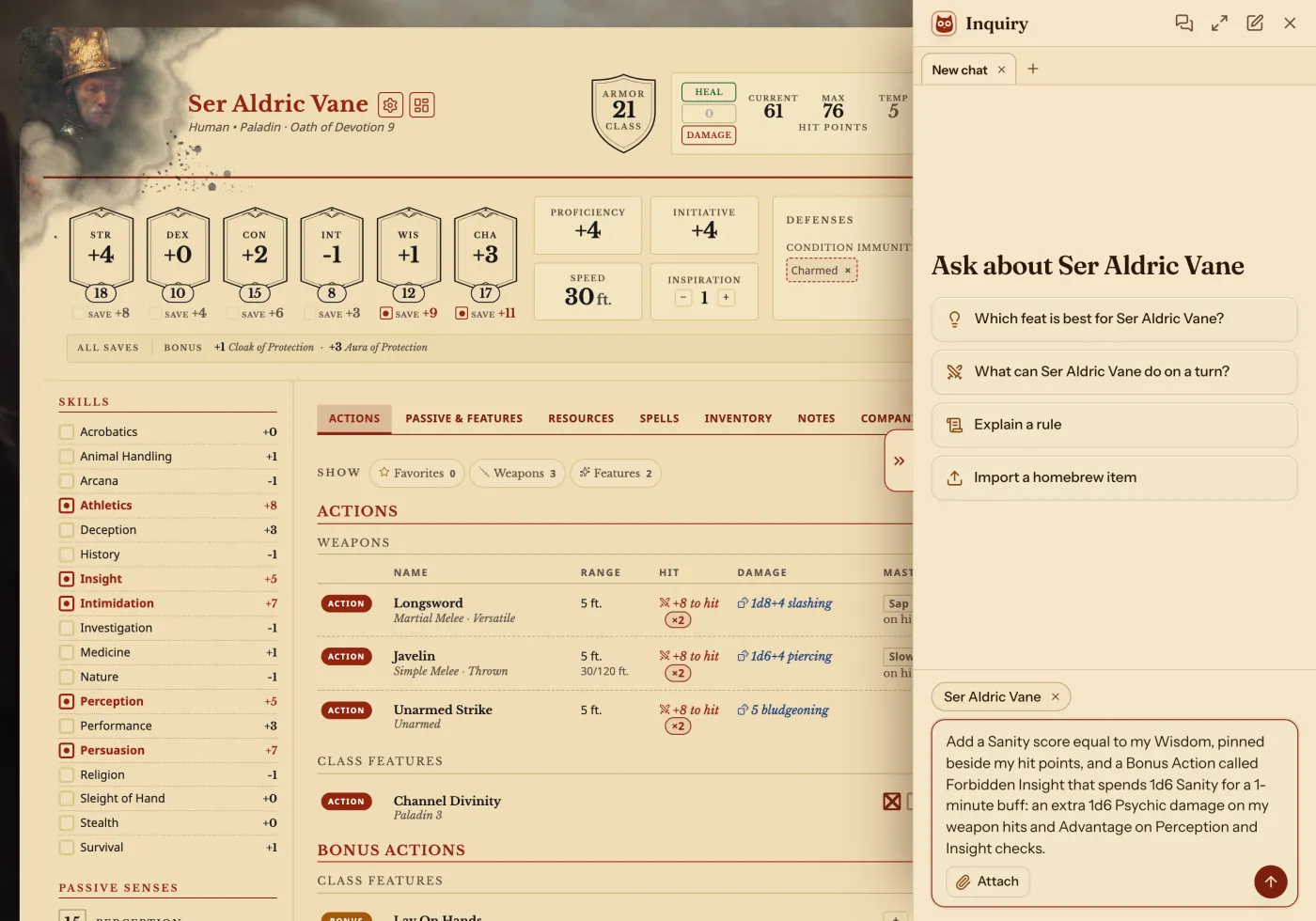
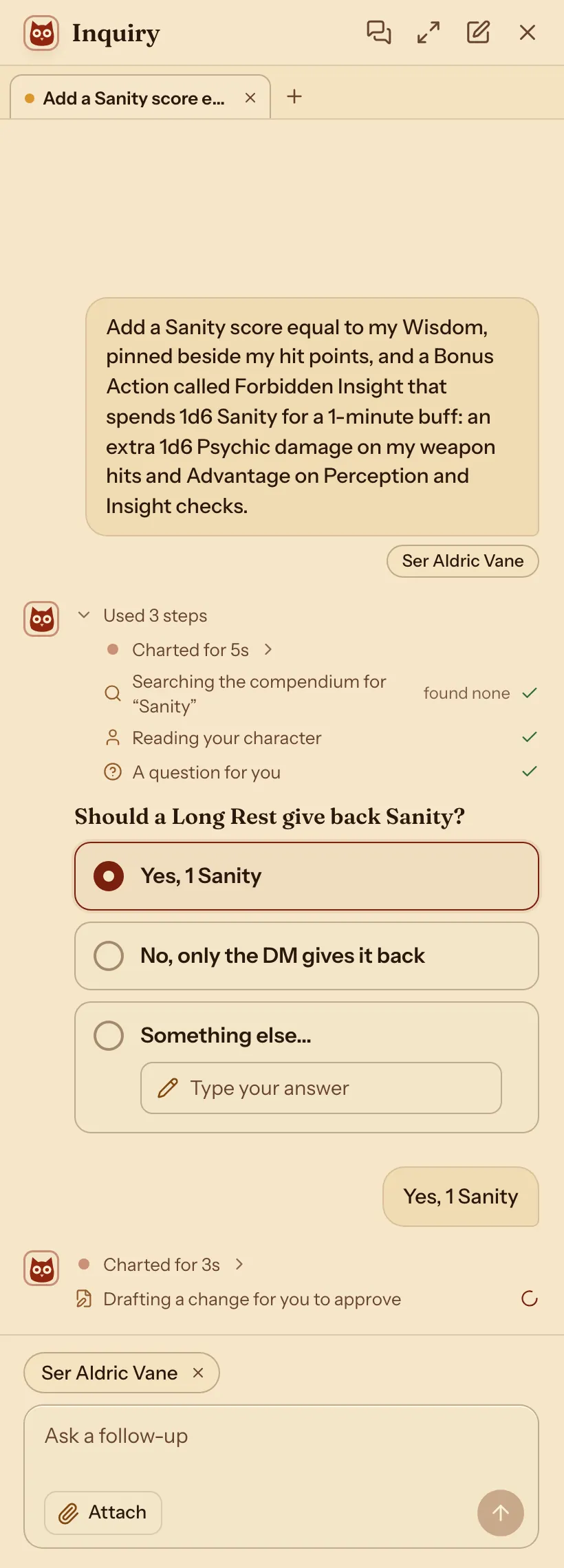
It may ask you something first. Pick an answer and press Send.
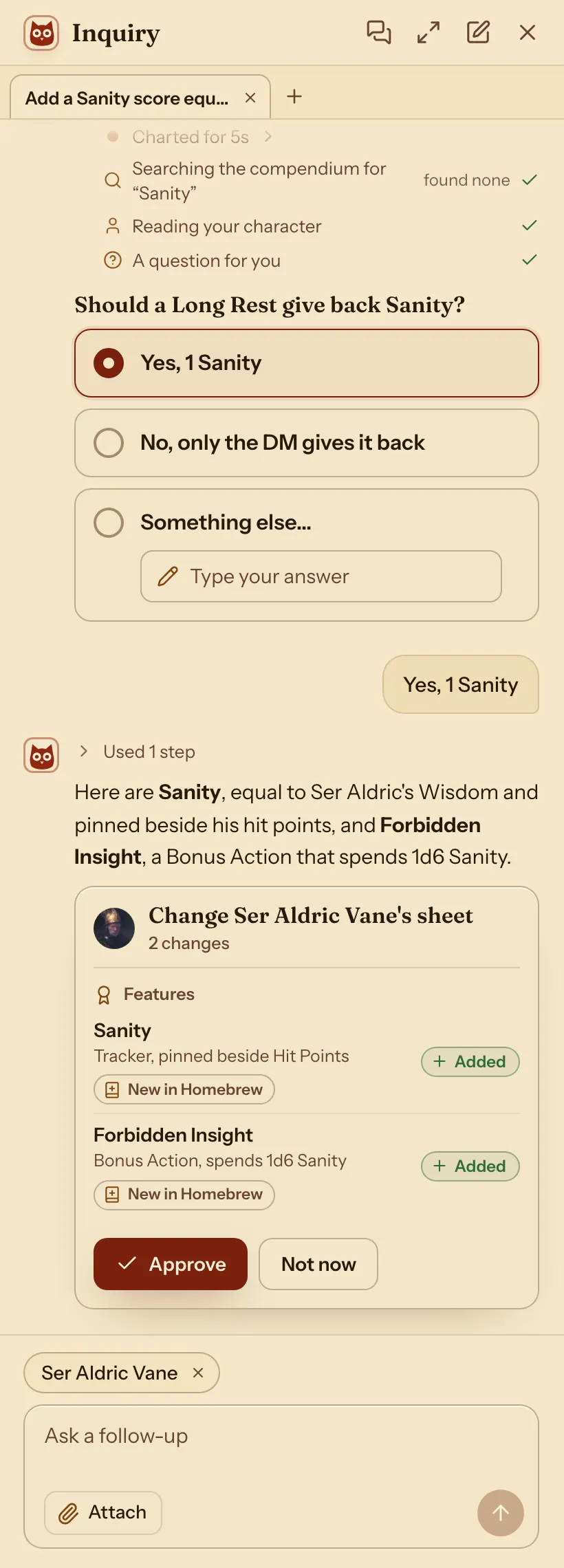
It shows what it adds. Nothing changes until you press Approve.
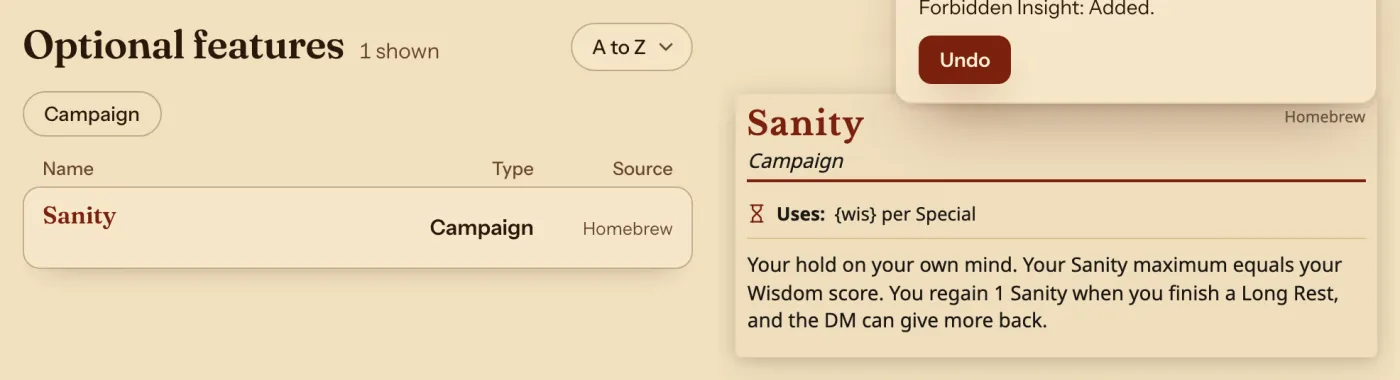
Sanity is in the Compendium.
Sanity on the sheet's top strip, beside its uses.

Change an existing one with the Archivist Inquiry Assistant
- Open the sheet of a character who has Sanity, or the Compendium, and press the owl.
- Say what to change in Sanity or Forbidden Insight.
- Check what it suggests and press Approve. Characters who have it change with it.
For exampleMake my Sanity maximum 10 plus my Wisdom modifier, and let a Short Rest give back 1 Sanity too.
You can undo it.
Do it by hand: make the Sanity tracker
- In the top bar, press Compendium, then Optional features in the list on the left.
- Search for Devil's Sight, press it, then press Copy to my compendium. Under To, press Homebrew, then Copy.
- Press your copy, the one with Homebrew under Source. Above its card, press ⋯, then Edit.
- Select all the text in the Text box, paste these lines over it, and press Save:Sanity
name: Sanity edition: '2024' source: Homebrew feature_type: campaign description: Your hold on your own mind. Your Sanity maximum equals your Wisdom score. You regain 1 Sanity when you finish a Long Rest, and the DM can give more back. prerequisites: [] available_to: [] effects: [] uses: max: '{wis}' recharge: custom recovery: - id: sanity-long-rest name: Long Rest amount: 1 reset: long-rest surface: band - Press ⋯, then Rename. Press Change beside Link name, type
homebrew_optional-feature_sanityand press Rename.
max: '{wis}' makes the maximum your Wisdom score, and it follows the score when it changes. The link name is how the ability below finds this tracker.
Make the ability that spends it
- Do the same with Eldritch Mind: copy it to Homebrew, press Edit on your copy, paste these lines and press Save:Forbidden Insight
name: Forbidden Insight edition: '2024' source: Homebrew feature_type: campaign description: "As a Bonus Action, you let the whispers in. Roll `dice:1d6` and spend that much Sanity. For 1 minute, your weapon hits deal an extra 1d6 Psychic damage, and you have Advantage on Wisdom (Perception) and Wisdom (Insight) checks." prerequisites: [] available_to: [] action_cost: bonus-action activatable: true duration: amount: 1 unit: minute consumes: resource: homebrew_optional-feature_sanity amount: 1 amount_max: 6 effects: - kind: damage-bonus damage_type: psychic amount: 1d6 applies_to: weapon - kind: roll-modifier mode: advantage roll: ability-check scope: Perception and Insight - Rename it the same way, with the link name
homebrew_optional-feature_forbidden-insight.
consumes is what one use spends: 1 to 6 Sanity. activatable gives it the Activate button, and its effects count only while it is on.
Give both to your character
- Open your character, press the gear beside the name, and choose Export as Archivist file (.md).
- Open the file in any text editor. Near the top, find the line of three backticks followed by
pc. Add these three lines right under it, then save the file:Your character's fileadditional_features: - "[[homebrew_optional-feature_sanity]]" - "[[homebrew_optional-feature_forbidden-insight]]" - In Archivist, press Characters, New character, then Import a sheet. Press Choose file and pick the file.
- Archivist says your character is already here. Press Import, choose Replace, and press Import again. Then press Open and your character's name.
Replace puts the new file over the old one, so you do not end up with two copies.
Play it
- Sanity sits on the strip at the top of the sheet, beside your Hit Dice. Press − or + to change it, or press the number and type.

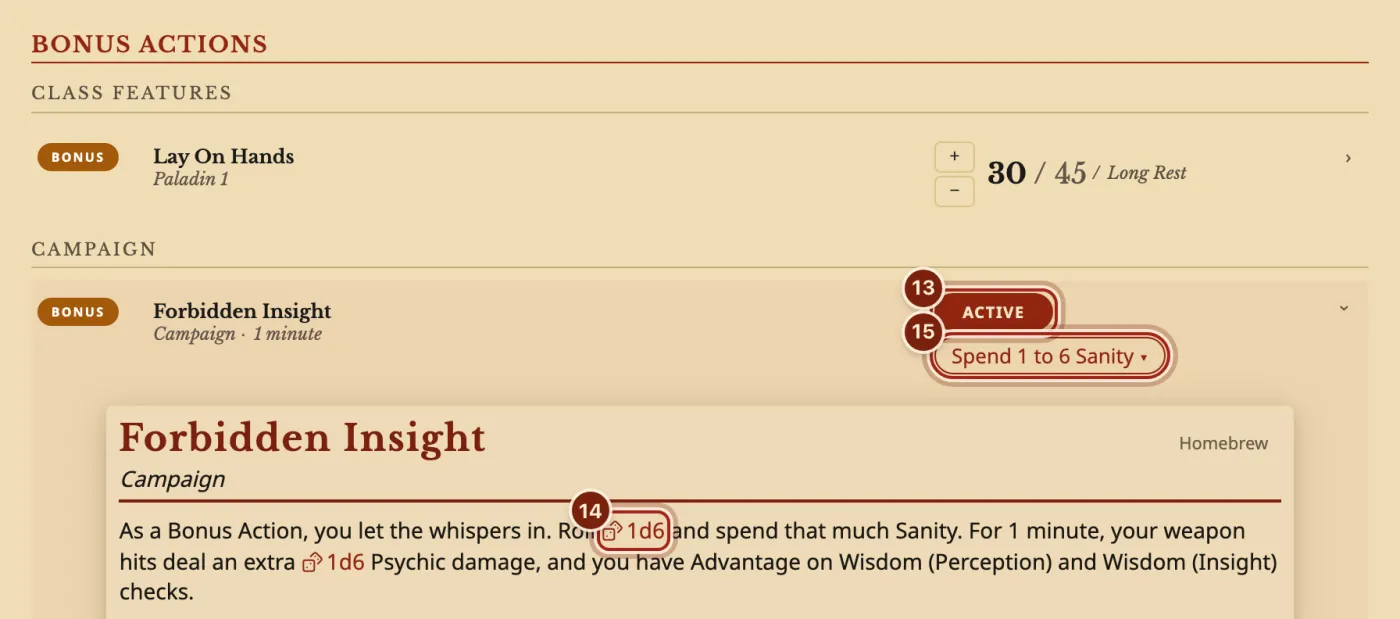
- On the Actions tab, under Bonus Actions, press Activate on Forbidden Insight. It reads Active for as long as it is on.
- Press the row to open its card, and press 1d6 to roll.
- Press Spend 1 to 6 Sanity and press − once for each point you rolled.
While it is on, each weapon row's damage reads, for example, 1d8+4 slashing + 1d6 psychic, and Perception and Insight roll with Advantage. Press Active again after the minute to switch it off. Every rest also offers to end it.
What the sheet does with it
Everything below comes from the lines you pasted. Change a number and the sheet follows.
| Part | On the sheet |
|---|---|
| Sanity's maximum | Your Wisdom score. A higher Wisdom raises it at once and keeps what you spent. |
| Losing and gaining Sanity | − and + on the top strip, or type the number. It never refills by itself. |
| A Long Rest | Gives back 1 Sanity, listed in the Long Rest window with a box you can untick. |
| Forbidden Insight | A Bonus Action row with Activate, its duration and Spend 1 to 6 Sanity. |
| While it is active | +1d6 Psychic on every weapon's damage, and Advantage on Perception and Insight checks. |
| Rolling the cost | The 1d6 in its card rolls the dice. You then take that many points off with Spend. |
Questions
Can Archivist take the rolled amount off by itself?
You roll the 1d6 from the card and press − that many times. Switching the ability on never spends Sanity by itself, so you can also use it when your DM sets the cost.
Can I put Sanity somewhere else on the sheet?
Yes. It is also on the Resources tab. To choose what sits on the top strip and in what order, see Choose the resources on top of your sheet.
I am the DM. How do my players get it?
Send them this page. Each player asks the Archivist Inquiry Assistant on their own sheet, or makes the two entries and adds the three lines by hand.
Save does nothing. What now?
Save waits until the text can be read, and a line over the Preview says what to fix, such as "Line 12 can't be read. Check its spacing and colons." Put the spaces back at the start of that line. If a sentence has a colon in it, put the whole sentence in double quotes.
Can I make a different resource the same way?
Yes: Hero Points, Corruption, Stress or Luck. Change the name, the description and the max line, such as max: 5 or max: '{prof}' for your Proficiency Bonus.
Keep going
- Choose the resources on top of your sheetAppearance, then Pinned: pick up to five and put them in order.
- Track Rage, Channel Divinity, Bardic Inspiration and Focus PointsEvery use is a tick box or a counter, and rests fill them back.
- Compendium format guideLet the Archivist Inquiry Assistant write entries, or learn the lines by hand.
- Format guide: optional featuresAsk the Archivist Inquiry Assistant, or paste ready lines for an option.
- Share homebrew with your partyExport your compendium as a zip; they bring it in with Import homebrew.