How to choose the resources on top of your sheet
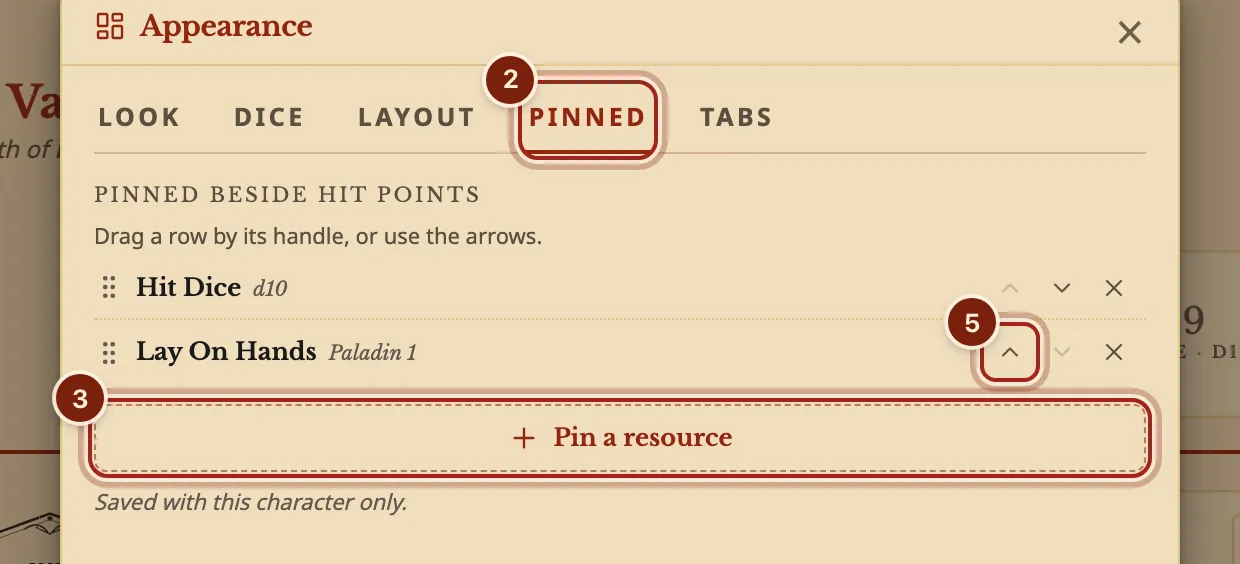
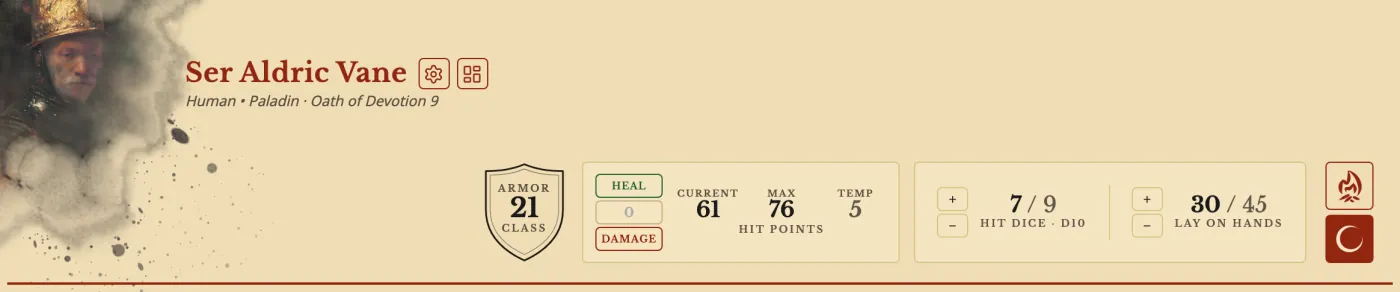
The short answerOpen Appearance on your sheet and press Pinned. Press Pin a resource and choose up to five, such as Lay On Hands or Rage, then move them with the arrows: they sit on the strip beside your hit points, with + and −, in that order.
- For players
- 6 short steps
- Updated 7 November 2026, for Archivist 1.4.0
The example is Ser Aldric Vane, a Paladin 9, pinning Lay On Hands beside his Hit Dice.
Pin a resource
- On your sheet, press the button beside the gear by your character's name to open Appearance.
- Press the Pinned tab. It lists what sits beside your hit points now.
- Press Pin a resource. Your resources are listed under Short Rest, Long Rest and Doesn't reset.
- Press each one to pin, then Done.
- Use the arrows to change the order, or drag a row by its handle. Press × to unpin one.
On a phone, press your portrait or name, then Appearance, then Pinned. On a phone the strip scrolls sideways.
- Close the window. The pinned resources sit on the strip at the top of the sheet, each with + and −.
What you can pin
Anything on your Resources tab, up to five at a time. Hit points are always there.
| You can pin | Such as |
|---|---|
| Your Hit Dice | Hit Dice d10, as one entry |
| Class, species and feat resources | Rage, Channel Divinity, Lay On Hands, Focus Points |
| Homebrew resources | A Sanity tracker or Hero Points |
| Charges on an equipped item | A wand's charges |
| Bardic Inspiration from another bard | The treble clef, which you press when you use it |
Questions
What sits there before I choose?
Your Hit Dice and any resource its entry marks for the strip. Reset to defaults goes back to that.
Can I pin spell slots?
Spell slots stay on the Spells tab, beside the spells that use them. See Track spell slots.
Can a homebrew resource start pinned?
Yes. Give it surface: band, as the Sanity tracker in Add Sanity to a character sheet does.
Keep going
- Track Rage, Channel Divinity, Bardic Inspiration and Focus PointsEvery use is a tick box or a counter, and rests fill them back.
- Make your sheet yours: colors, paper and portrait looksPick a Color, a Paper, a backdrop and the portrait's look.
- Add Sanity to a character sheetAsk the Archivist Inquiry Assistant for Sanity and an ability that spends it, or build both by hand.