How to keep campaign notes as a DM
The short answerOn your campaign's Notes tab, press New, then Page. Write your notes in Markdown: headings, lists and checklists format as you type, [[ links a note, a party character or any Compendium entry, and {{ puts a monster's full stat block in the page. Every page stays private until you share it with Seen by.
- For DMs
- 6 short steps
- Updated 7 November 2026, for Archivist 1.4.0
The example is a page for a session at the drowned bell, with a ghoul's stat block.
Write a page
- Open your campaign and press the Notes tab.
- Press New, then Page, and type a title.
- Write. Type
##for a heading,-for a list or- [ ]for a checklist; it formats as you type and saves as you go. - Type
[[and a few letters to link another page, a party character or a Compendium entry, and press Enter. - Type
{{to put a monster's, spell's or item's full block in the page, on a line of its own. - Press Seen by when you want players to read it: All players, or tick some of them.
Type / for a list of formats and inserts, or select words for Bold, Italic, Heading, Checkbox and Link. On a phone, a bar above the keyboard has them.
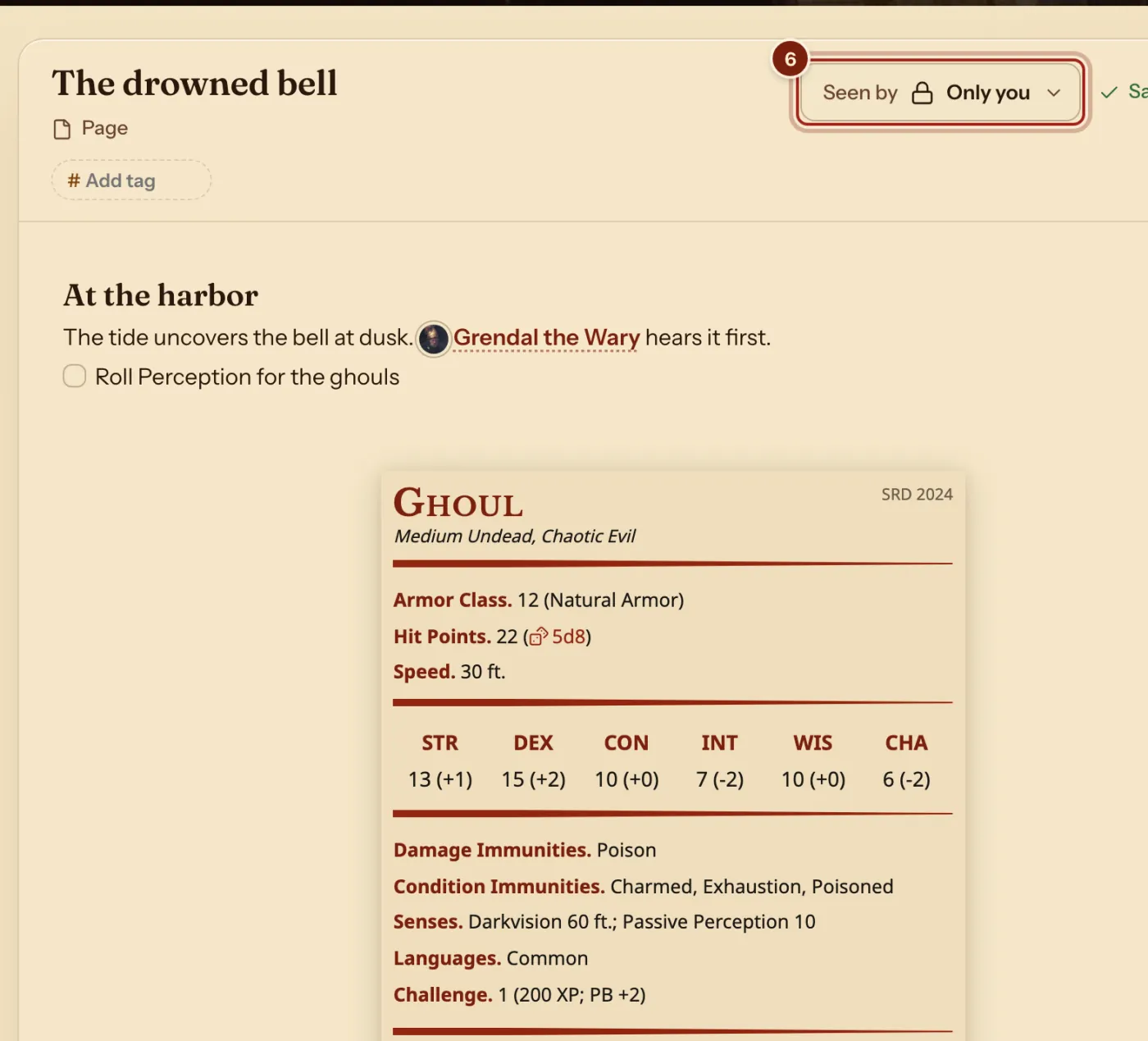
What the note editor does
One page, formatted as you type.
| You type or do | You get |
|---|---|
## , - , 1. , > , - [ ] | Headings, lists, numbered lists, quotes and checkboxes you can tick. |
bold, *italic*, ~~struck~~ | Bold, italic and struck-through words. |
[[ | A link to a page, a handout, a party character or any Compendium entry. |
{{ | A monster's, spell's, item's or other entry's full block, in the page. |
| Paste or drop a picture | The picture in the page, with corners to resize and a caption. |
| New, then Handout | A page that carries a PDF or a picture for your players. |
| Tags and Search notes | Find any page by its words or its tag. |
Questions
Can I write my notes in Markdown?
Yes: headings, bold and italic, lists, checklists, quotes, tables, code, pictures, and [[ ]] links between notes. Most of it formats as you type.
Do my players see my notes?
No. Every page starts as Only you. Share one with Seen by when you are ready.
What happens when I rename a page?
Every link to it is updated, and the page lists what links to it under Linked from.
Can I read my players' notes?
When a player shares their character notes, they appear under Players on your campaign's Notes tab.
Can I roll from a stat block in my notes?
Yes. Press its attacks and damage dice to roll them. See Add a monster as a companion and roll from its stat block.
Can I share a map?
Yes, as a handout. See Share maps and handouts.
Keep going
- Share maps and handouts players can zoom, pan and downloadAttach the picture or PDF to a handout and share it.
- Character notes for playersYour character's Notes tab: links, pictures and the DM's handouts.
- Keep campaign notes and share handoutsPages on the Notes tab, and handouts with a PDF or a picture.